Check your receiving account before requesting a withdrawal. Choosing the wrong institution can send the request into a support query.
Betstar77 Mexico cash out guide explains the account setup users. However, these screens show account registration, rather than a completed payout. Follow the visible bank options carefully, confirm the withdrawal route, and review your details before submitting the account form.
Prepare your Betstar77 Mexico cash out account
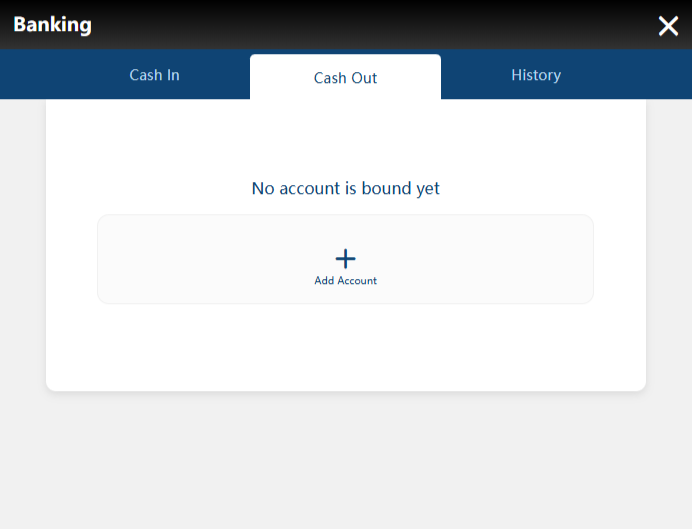
Open Banking from your signed Mexico account, then select Cash Out. The first screen shows No account is bound yet. That message means this screen has no linked receiving account available. Therefore, choose Add Account to open the registration form.
Keep your bank account details nearby so you can compare each field. Meanwhile, check the account information inside your own bank app rather than relying on memory.
If an active promotion affects withdrawals, review its terms separately. Also, make sure you understand any applicable conditions before submitting a payout request.
Account registration and withdrawal approval are different checks within the process. For that reason, adding bank details does not confirm that your entire displayed balance is available to withdraw. Keep any account verification records available for support.
Check the provider before entering account information
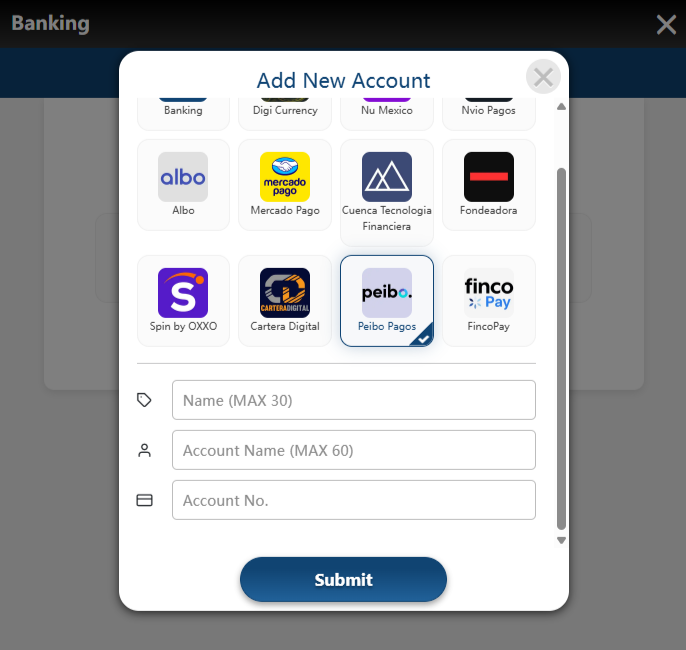
The Add New Account window displays several banks and payment providers. For example, one screenshot shows Peibo Pagos selected, alongside other available options.
That selection illustrates the interface and does not mean every withdrawal uses Peibo. Instead, select the institution or route that matches your receiving account. No supplied screen labels a withdrawal option as LeliPay. Therefore, confirm the correct route with support if you originally deposited through that provider.
Deposit and withdrawal screens can present different labels and account requirements. However, a familiar logo alone does not confirm that it suits your particular account.
Check the selected tile before typing any details into the form. Afterwards, scroll within the window to review the fields for that selection.
Choose Banking for the illustrated bank account route
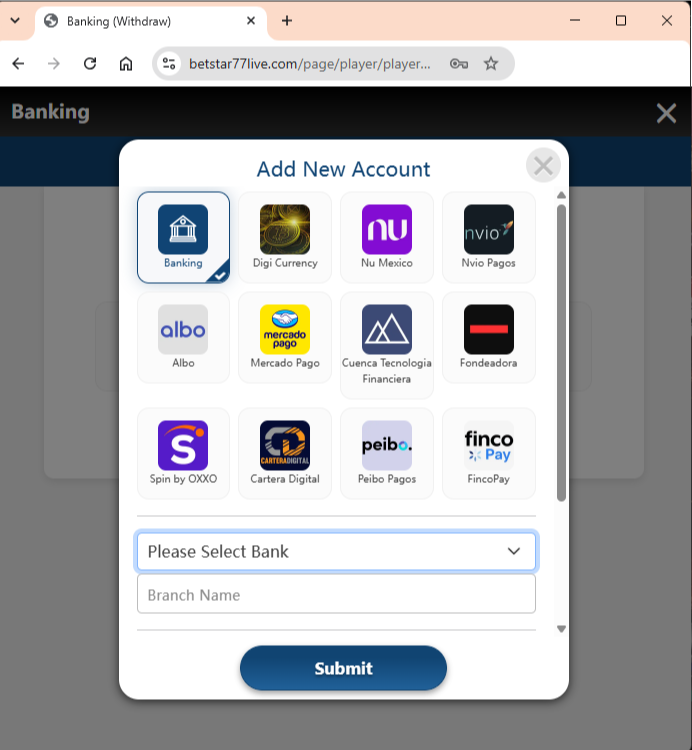
Here, Banking carries the blue selection outline and checkmark. Below the provider tiles, the form shows Please Select Bank and Branch Name. Follow this route when the platform confirms it matches your bank account. Then open the bank selector to view the available institutions.
This Betstar77 Mexico cash out screen still concerns account registration. It does not show the withdrawal amount or an instruction to authorize a bank transfer.
Therefore, do not send another deposit while trying to add a receiving account. Keep the account setup task separate from any payment request.
If Banking does not appear, ask which route currently supports your account. Meanwhile, avoid choosing another provider simply to bypass the missing option.
Select the receiving bank from the dropdown
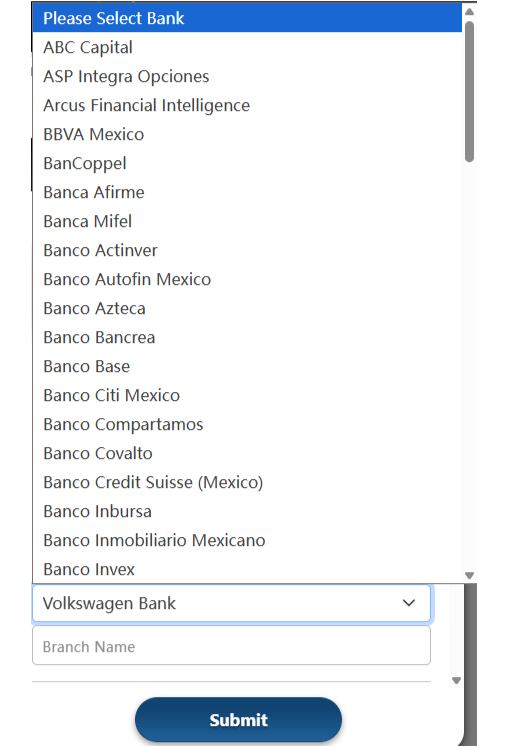
Open Please Select Bank and scroll through the institution list. The example includes BBVA Mexico, BanCoppel, Banco Azteca and several other banks. Choose the institution associated with the receiving account you intend to register. However, the presence of a bank name does not establish approval for every account.
One screenshot displays Volkswagen Bank in the selector beneath the open list. Another shows BBVA Mexico after selection, so treat these as separate interface examples.
Neither bank represents a recommendation or a required choice for all users. Instead, compare the institution name with your own banking records.
The form also displays a Branch Name field. If you cannot identify the required branch information, confirm the expected entry with support before continuing.
Review the account fields before selecting Submit
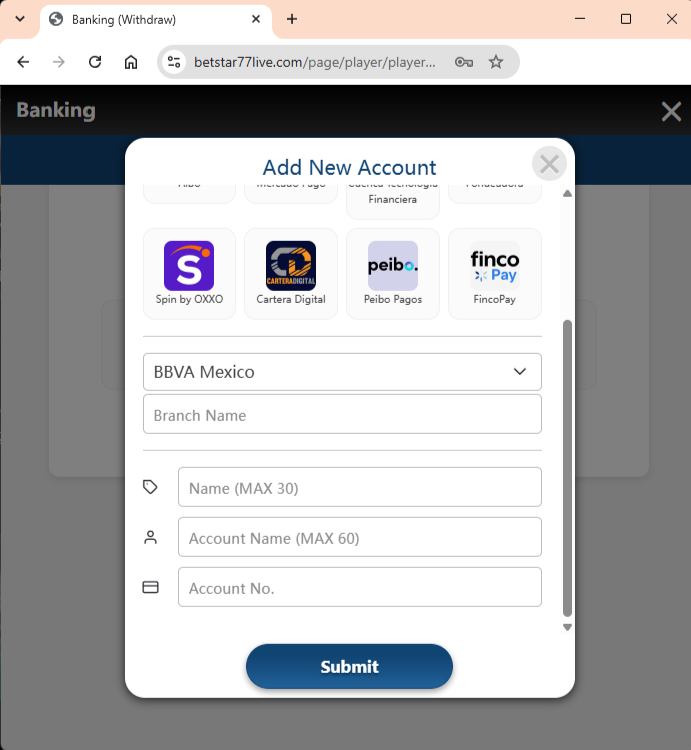
Finally, the form shows BBVA Mexico selected above the remaining account fields. Next, review Name, Account Name and Account No. before submitting anything.
Name displays a maximum of 30 characters, while Account Name allows 60. However, those labels alone do not explain whether Name means an account nickname. Confirm unclear field meanings with support and enter accurate receiving account information. In addition, check which account identifier the selected route requires.
This screenshot does not specify whether Account No. requires a CLABE or another identifier. Therefore, avoid guessing from the label alone.
Before selecting Submit, check for spaces, missing digits and typing errors. A correct bank selection cannot fix an incorrect account number. Review the institution and every entered detail, then select Submit when everything matches. Afterwards, return to Cash Out and check whether the account appears.
Check the withdrawal status
A linked account prepares the receiving details, but it does not confirm a completed withdrawal. Next, follow the current payout form and review its amount, conditions and status.
Keep this Betstar77 Mexico cash out checklist handy when checking your setup. If a request remains pending, contact official support with its reference.